
Phone Reviews
LinkedIn Sound on Connection Accept: How to Turn It Off
Learn how to turn off LinkedIn sound on connection accept off in this step-by-step guide. Stop the audio clutter and control your notifications today.

You want your phone to stay quiet when a stranger sends you a connection request. LinkedIn does not always make that easy. The platform keeps adding audio features and notification layers, and some of them fire off without warning. If you are tired of hearing a chime every time someone taps “Connect,” this guide walks you through turning off LinkedIn sound on connection accept off in a few minutes.
Before you start, know what you are dealing with. LinkedIn has rolled out audio events for Creator Mode users, and it automatically follows people who send connection requests to creators. That means more activity, more notifications, and more chances for your phone to buzz. The steps below are based on LinkedIn’s current settings menu. If your app version looks different, the labels may vary slightly, but the path is close.
Step 1: Open LinkedIn and go to your profile
Tap your profile picture in the top-left corner of the mobile app. On desktop, click the “Me” icon at the top of the page. This opens the menu where all account-level settings live. Do not confuse this with the feed settings, which only control what you see, not what you hear.
Step 2: Find Settings & Privacy
Scroll down and tap “Settings & Privacy.” On mobile, it is near the bottom of the menu. On desktop, it is under the “Me” dropdown. This section holds your account preferences and notification controls.
Step 3: Go to the Communications tab
Inside Settings & Privacy, tap “Communications.” This is where LinkedIn groups email, push, and in-app alerts. You will see options for “On LinkedIn,” “Push,” and “Email.” The sound you hear when someone accepts your request or sends you one usually falls under push notifications.
Step 4: Open Push notifications
Tap “Push” to see every category LinkedIn can push to your phone. Look for entries like “Connecting and following,” “Invitations,” and “Accepted invitations.” These are the ones tied to connection activity. If your phone plays a sound when a request is accepted, one of these toggles is responsible.
Step 5: Toggle off the connection-related alerts
Switch off “Invitations” and “Accepted invitations.” If you still want to know when someone accepts, keep the in-app badge but turn off the push. That way your phone stays silent, but you can check the app when you want. Repeat for “Connecting and following” if you do not want any noise from new followers.
Step 6: Check your phone’s system settings
LinkedIn can only control so much. Your phone’s notification settings have the final say on sound. On iPhone, go to Settings > Notifications > LinkedIn and turn off “Sounds.” On Android, go to Settings > Apps > LinkedIn > Notifications and disable the sound channel. This is the step most people miss, and it is why the chime sometimes comes back after an app update.
Step 7: Handle Creator Mode if you have it on
If you have Creator Mode enabled, LinkedIn automatically adds anyone who sends you a connection request as a follower. That means more feed activity and potentially more notifications. To check, go to your profile and look for the Creator Mode section. If it is on and you do not need it, turn it off. This reduces the volume of connection-related alerts at the source.
A quick note on audio events. LinkedIn now offers audio events to Creator Mode users, similar to Clubhouse or Twitter Spaces. These are live, scheduled sessions, not random sounds. They will not play unless you join one. But if you follow creators who host them, you may get push alerts. You can mute those under the same Push menu by turning off “Events.”
Why this matters beyond the noise
Kevin O’Leary, the Canadian investor, has said publicly that a missing LinkedIn profile is a red flag for employers. He told job seekers that recruiters check posts, history, and digital footprint. That means you should stay on the platform, but you do not have to let it interrupt your day. Turning off sound on connection accept off is about controlling the channel, not abandoning it.
There is also a privacy angle. LinkedIn has confirmed it uses user data to train AI models unless you opt out. The deadline for some regions was November 3, 2025. You can opt out by going to Settings & Privacy > Data privacy > Data for Generative AI Improvement and toggling off “Use my data for training content creation AI models.” While you are in settings, it makes sense to handle both the noise and the data.
Tips for keeping it quiet long-term
App updates sometimes reset notification preferences. Check your push settings once a month. If you use LinkedIn mostly on desktop, you can ignore most of this, but the mobile app is where the sounds live. If you run a company page, audio events may still be useful for engagement. Insider found that its LinkedIn audio event on AI and jobs drew over 900 live attendees. You can keep those alerts on while silencing personal connection noise.
For most people, the fastest fix is Step 5 plus Step 6. Turn off the push toggles inside LinkedIn, then kill the sound at the OS level. That combination survives most app updates.
What to do next
After you turn off LinkedIn sound on connection accept off, test it. Ask a friend to send you a connection request and accept it. If your phone stays silent, you are done. If not, go back to your phone’s notification settings and check that the sound channel is fully disabled. Then review your other push categories, like messages and job alerts, so you only hear what actually matters. That is the real win: a LinkedIn that works for your career without hijacking your attention.
Frequently Asked Questions (linkedin sound on connection accept off)
Why does my LinkedIn still make a sound after I turned off notifications?
Your phone’s system settings likely override the app. Go to your phone’s Settings > Notifications > LinkedIn and turn off Sounds. App updates can also reset in-app toggles, so check both places.
Does LinkedIn automatically follow people who send connection requests?
Yes, if the person receiving the request has Creator Mode turned on. LinkedIn automatically adds the sender as a follower, so they see the creator’s posts even while the request is pending.
Can I turn off LinkedIn audio event notifications separately?
Yes. In Settings & Privacy > Communications > Push, you can toggle off Events while keeping other alerts on. Audio events only play when you join them, but push alerts can still fire.
Related Articles
- Summer Walker Claims LVRN Hid YouTube Cash
- Lagos Gives Telcos 30 Days to Verify Gaming Licences
- Jimmy Kimmel Takes Aim at Trump’s New Press Secretary
- Protecting Adolescent Health: Nigeria’s Future Depends on It
- Pope Leo XIV Lung Cancer: What His Diagnosis Teaches Us
 Follow AFRILATEST on Google News
FIRST TIME REACTIONS:
Be the first to leave us a comment – LinkedIn Sound on Connection Accept: How to Turn It Off, down the comment section.
JOIN US ON OUR SOCIAL MEDIA:

Phone Reviews
ServiceNow AI Review: What BNP’s Demand Call Misses
ServiceNow AI demand is rising, says BNP Paribas. A practical review of what the platform actually does, what it costs, and where the evidence is thin.


ServiceNow is an enterprise workflow platform that runs IT help desks, HR casework and security operations, and now sells ServiceNow AI features built to automate that work and oversee other AI agents. BNP Paribas argues demand for those features will push the company into a second growth phase.
That is a business claim. The more useful question for anyone actually buying the software is narrower: which of these ServiceNow AI features demonstrably work, at what cost, and under what conditions?
The Evidence Behind The ServiceNow AI Demand Call
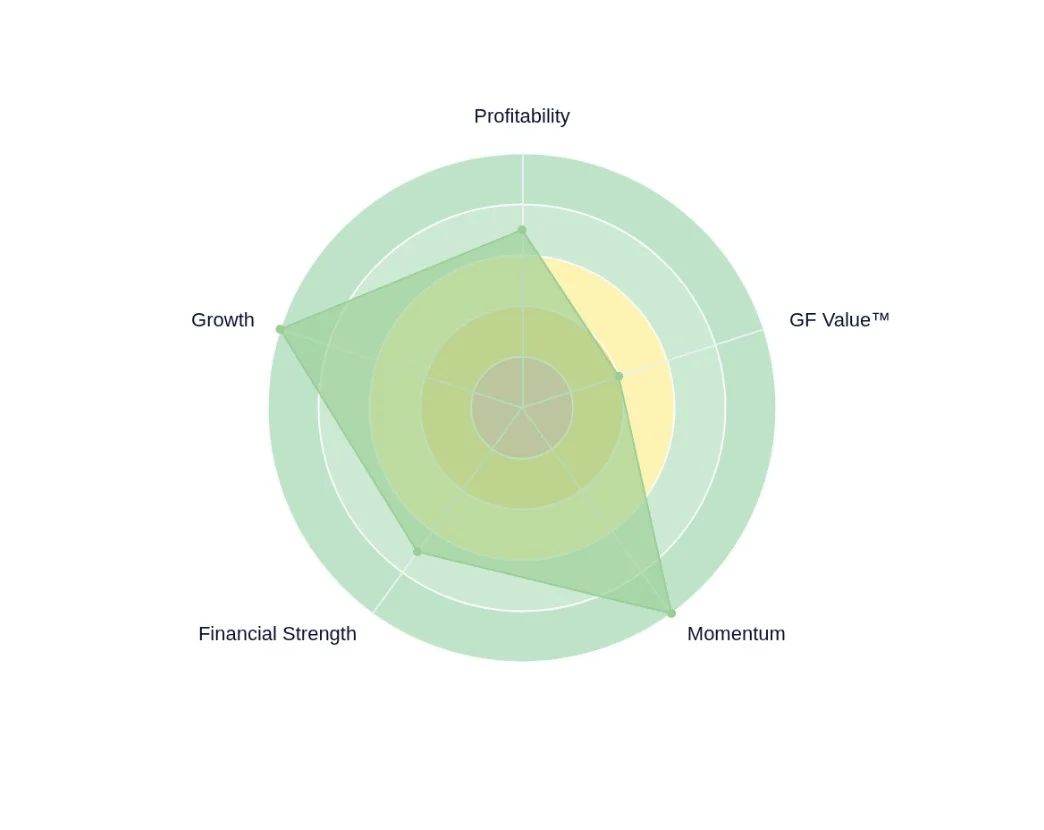
BNP analyst Stefan Slowinski reiterated an Outperform rating and raised his price target to $160 from $140, arguing organic subscription growth holds near 19% through the end of fiscal 2026 and that AI revenue reaches roughly 9% of annual recurring revenue by year-end, according to GuruFocus. He compared the setup to Atlassian’s recent re-rating.
The underlying evidence came from customer and partner conversations at ServiceNow’s World Forum in London. One partner, Slowinski wrote, was saving “30-40% on its IT help desk by using ServiceNOW, allowing it to cut its spending with a BPO supplier.” Partners were hiring aggressively in their ServiceNow practices. One large partner said ServiceNow had become its fourth-largest US practice, behind Microsoft, SAP and Oracle, per Seeking Alpha.
Read that carefully. The 30-40% figure is a single partner’s self-report, relayed second-hand by an analyst, with no baseline disclosed: no headcount, no ticket volume, no statement of whether the saving is gross IT cost or the narrower line item of outsourced BPO spend. It is plausible. It is also not independent testing.
A second analyst team, UBS, spoke to ServiceNow partners too and reached a more guarded read: interest in AI products including AI Control Tower is increasing, but “the impact on actual spending remains limited so far.” UBS lifted its target to $150 from $110 and kept a neutral rating, Yahoo Finance reported. Same method, same quarter, opposite emphasis. Neither note substitutes for a proof of concept on your own data.
How The Platform Is Actually Used
The functions BNP lists are concrete and testable: auto-assigning work, deflecting cases before they reach a human, and rewriting knowledge articles so AI systems can consume them. Inside an IT help desk those translate into hard numbers: tickets deflected per month, mean time to resolution, percentage of article content reused by an assistant.
That is where buyers should aim scrutiny. Ask for a deflection rate on your own ticket taxonomy, not a vendor benchmark. Ask whether auto-assignment changes routing only or actually resolves the case. ServiceNow reports third-quarter results on Wednesday, 28 October, and the stock had gained roughly 6% this year while sitting about 1% lower on the Monday before publication, so the market is not yet pricing the acceleration BNP predicts.
How To Use It Without Overpaying
The April price changes moved customers into Foundation, Advanced and Prime tiers, with AI now included in each. BNP quotes a partner saying there is “no reason not to try it” as a result.
That is bundling logic, not a discount. The tier is the price. The source material does not disclose what any of the three tiers costs, so the honest position for a buyer is to get the delta between your current contract and the tier containing the ServiceNow AI you actually need, in writing, before agreeing to a pilot. Bundled AI is not free AI; it is AI priced into a subscription you can no longer unbundle.
The Costs And Risks The Analyst Notes Skim
Control Tower, the product for overseeing AI agents and their activity, drew high interest but adoption “remained at an early stage,” by BNP’s own account. UBS repeated the point. Governance tooling for AI agents is being sold ahead of the agents it governs. A buyer paying for capacity that cannot yet be used is absorbing roadmap risk.
Growth is also coming mainly from renewals, expansion inside existing accounts, upgrades to premium tiers and usage-based pricing, not from new customers, according to UBS. That is a fine model. It does mean the platform’s reach is not widening as fast as the headline suggests.
Third, the demand picture is geographically narrow. The World Forum was in London, the quoted partner was describing its US practice, and the US federal government is named as a catalyst. Nothing in these notes addresses African deployments, local-currency pricing, data residency or connectivity constraints. For a Nairobi or Lagos enterprise, a US-dollar annual contract on a depreciating local currency is a materially different purchase than it is for a Chicago insurer. The BNP note should not be read as a buying signal in markets the research never covered.
Pros And Cons Of The Current Pitch
Pros: the ServiceNow AI claims about deflection and auto-assignment are specific and measurable; AI now sits in every tier, which lowers the entry decision; renewal-driven growth shows existing customers are renewing and expanding; and security plus governance could add a second engine, with BNP expecting security to approach 10% of revenue in 2027.
Cons: the marquee savings figure is one unverified partner anecdote; measured impact on spending is, by UBS’s read, still limited; Control Tower adoption is early; tier pricing is absent from the source material; and the research base excludes African market conditions entirely.
Alternatives
For mid-market buyers who need ticket deflection rather than a single platform across IT, HR and security, the relevant comparison is to narrower ITSM and help-desk tools, or to the BPO arrangement that partner reduced rather than eliminated. ServiceNow’s pitch is consolidation. If your operation is one help desk and 40 agents, consolidation is not your problem.
Who Should Use It, And Who Should Walk Away
Large enterprises already running ServiceNow, with existing contracts and a defined help desk, should test the ServiceNow AI features as a renewal lever, with deflection rates written into the pilot agreement and a baseline captured before anything is switched on. Organisations evaluating their first workflow platform should start smaller. African buyers without a local reference customer should treat the ServiceNow AI demand story as a vendor-side narrative until they hold their own numbers.
The 28 October earnings call will produce real figures on subscription growth and AI revenue. Until then, the strongest public evidence is one partner’s 30-40% claim. That is a claim, not a test.
Frequently Asked Questions
What does ServiceNow actually do with AI today?
According to BNP Paribas’ partner conversations, the proven uses are auto-assigning work, deflecting cases before they reach a human, and rewriting knowledge articles so AI systems can consume them. A separate product, AI Control Tower, helps companies oversee AI agents, but both BNP and UBS describe its adoption as early stage.
Is ServiceNow AI included in the subscription price?
Following April price changes, customers moved to Foundation, Advanced and Prime tiers with AI included in each. That is bundling, not a discount: the cost is carried in the tier price, and the source material does not disclose what any tier costs.
How reliable is the 30-40% help desk saving figure?
It is one partner’s self-report, relayed second-hand by BNP analyst Stefan Slowinski, with no disclosed baseline, ticket volume, headcount or definition of which costs were cut. It is plausible but not independently verified, and UBS’s separate partner checks found AI spending impact still limited.
FIRST TIME REACTIONS:
Be the first to leave us a comment – ServiceNow AI Review: What BNP’s Demand Call Misses, down the comment section.
JOIN US ON OUR SOCIAL MEDIA:

About Xavier Catherine
Xavier Catherine is the Technology Lead at AfriLatest. With a background in computer science and a focus on innovation, he oversees the platform's technology infrastructure. Xavier also contributes reporting on AI, gadgets, and cybersecurity, ensuring AfriLatest remains secure, reliable, and user-friendly.
View all articles by Xavier CatherinePhone Reviews
Claude Duet Review: What Anthropic’s Agent Actually Changes
Claude Duet is Anthropic’s proactive agent, live in a US-only research preview. What it changes for users, what it costs, and how it stacks up to Muse and Dots.

Claude Duet is Anthropic’s always-on personal agent: a standalone app for iOS, Android and the web that messages you before you message it, works inside your connected apps, and keeps running after you close it.
That is the product in one line. Everything else in the launch material is a claim, and the gap between the two is where a buyer should look. Anthropic announced Claude Duet in late October 2026 as a research preview with a waitlist, restricted to Claude Pro and Max subscribers in the United States. Reporters covering the launch did not even agree on whether the announcement landed on a Tuesday or a Wednesday, which is a small reminder that basic facts are worth checking against Shattered and Business Insider rather than a single post.
The useful question is not whether Anthropic has an agent. It does, and it is the third major US lab to ship a consumer-facing one. The question is what the agent demonstrably changes for a person using it, and what it quietly takes away.

What Claude Duet Actually Does, Per Anthropic’s Own Wording
Anthropic’s product description is unusually specific about behaviour, and specific claims can be tested. The agent surfaces what it judges needs attention, completes tasks a user asks for, continues working on a cloud-based computer while the user is away from the device, and asks before acting.
The approval gate covers four categories: sending a message on the user’s behalf, making a payment, signing a document, and deleting anything. That is a narrow bright line, and it is the most concrete design decision in the whole launch. Lower-stakes work, meaning research, drafting, monitoring and the morning brief across connected apps, runs without a checkpoint.
Anthropic also stated that the preview “can still misjudge what’s urgent.” That admission matters more than any benchmark slide. A triage agent that pings you about the wrong thing has failed at its core job, and no published figure exists for how often that happens.
Memory, skills and connected apps carry over from the existing Claude account, so there is little setup. That continuity is a switching-cost argument dressed as a convenience feature: the more a user has taught Claude, the more expensive it becomes to leave.
Persistence, not conversation, is the actual change. A user who closes the app and returns to find work done has experienced something a chatbot cannot deliver. A user who receives a tidy morning brief has experienced a notification. The two get marketed together. Only the first is new.
What Has Not Been Published
No standalone price. No figure for how much of a plan’s usage allowance a typical session burns, though Anthropic confirms background agent activity counts against existing limits. No task success rates. No confirmation of what happens to access when the preview ends. And no third-party integration count, unlike OpenAI’s Dots, which launched wired into a reported 4,000-plus applications.
Claude Duet Ships Into A Very Narrow Door
Access is the constraint that shapes everything. Pro and Max subscribers in the US, by waitlist, with no Team or Enterprise tier.
That last exclusion is odd given the demo tasks: finding unpaid invoices and drafting reminders, preparing payroll data for a manager’s review, getting contracts ready to send out. Those are small business operations, not personal inbox hobbies. A Lagos consultancy chasing receivables is exactly the user the described features serve, and exactly the user the rollout excludes. No US subscription, no waitlist entry, no agent.
For Nigerian and other non-US users, the practical position today is unchanged. Claude remains a chat and coding assistant billed in dollars on Pro and Max tiers, with no agent layer attached. Anything promising local access to the preview should be treated as unverified until Anthropic says otherwise.
The “no new bill” framing also deserves scrutiny. Access is bundled into existing subscriptions, so there is no new line item, but background agent work draws on the same quota a subscriber would otherwise spend on conversation. Anthropic has not said how much. Heavy users may find the real cost is not money but a plan that runs dry faster.
How Claude Duet Compares With Muse And Dots
Meta shipped Muse on 8 September 2026, pushed it toward smart glasses at Meta Connect, and released Muse Wonder and Muse Wonder Full in October. Apptopia estimated more than 14 million Muse installations by launch week. OpenAI unveiled Dots at DevDay with a persistent cloud computer and a large integration catalogue.
Anthropic arrives last, with the smallest footprint and the most conservative guardrails. It also arrives with one genuine differentiator: Opus 5.5, the model it built the agent around, which Tech Insider reported hit 65.15% on Terminal-Bench 4.0. Spending a flagship reasoning model on background triage is expensive, and it signals Anthropic treats “what needs you” as a reasoning problem rather than a scheduling filter.
Skepticism is warranted elsewhere. That Duet’s product lead, Karan Ahuja, used Duet to build Duet is an anecdote from the person with the strongest incentive to praise it. Meta’s Alexandr Wang answered with a meme about the resemblance to Muse, which is evidence of a rivalry, not of a product. And Anthropic’s reported path toward an IPO at a valuation of up to $2 trillion says nothing about whether the agent works.
Who Should Use Claude Duet, And Who Shouldn’t
US-based Pro and Max subscribers with judgement-heavy administrative work, meaning invoices, scheduling, drafting and inbox monitoring, should join the waitlist. The downside is limited: no new bill, an approval gate on the four riskiest actions, and a preview label that sets expectations honestly.
Everyone else should plan around tools they can actually install. Teams and businesses on Claude should assume no access until the preview is extended. Users outside the US should not rebuild workflows around a waitlist they cannot join, and Nigerian SMEs weighing agents should compare Dots’ and Muse’s broader integration coverage against Claude Duet’s narrower, more cautious design before paying for any tier.
The verdict is narrow because the product is. Claude Duet changes one thing that can be verified, namely that work continues while the app is closed, and asks to be trusted on a dozen others. Judge it on the first, and ignore the valuation headlines until someone publishes a number that a user can check.
Frequently Asked Questions
Is Claude Duet available in Nigeria?
No. Anthropic has restricted the research preview to Claude Pro and Max subscribers in the United States, accessed through a waitlist. Team and Enterprise plans are also excluded for now, and Anthropic has said it plans to broaden availability later without giving a date.
How much does Claude Duet cost?
Anthropic has not published a standalone price. Access is bundled into existing Claude Pro and Max subscriptions, but background agent activity counts against the usage limits tied to that plan. Anthropic has not disclosed how much of an allowance a typical session consumes.
What is the difference between Claude Duet and Meta Muse or OpenAI Dots?
All three are persistent agents that work outside a chat window. Muse leans on Meta’s distribution and passed an estimated 14 million installations by launch week. Dots launched with a persistent cloud computer and a reported 4,000-plus connected apps. Claude Duet arrives last and smallest, but with a narrower approval gate on messaging, payments, signatures and deletions, and a flagship Opus 5.5 model behind its triage decisions.
FIRST TIME REACTIONS:
Be the first to leave us a comment – Claude Duet Review: What Anthropic’s Agent Actually Changes, down the comment section.
JOIN US ON OUR SOCIAL MEDIA:
About Xavier Catherine
Xavier Catherine is the Technology Lead at AfriLatest. With a background in computer science and a focus on innovation, he oversees the platform's technology infrastructure. Xavier also contributes reporting on AI, gadgets, and cybersecurity, ensuring AfriLatest remains secure, reliable, and user-friendly.
View all articles by Xavier CatherinePhone Reviews
iPhone Duo Pre-Order: 5 Steps to Secure Yours
iPhone Duo pre-order starts today at $1,999. Follow these 5 steps to secure launch-day delivery on October 23. Trade-in deals up to $1,200.


The iPhone Duo pre-order window is open right now, and if you want one on launch day, you need to move. Apple’s first foldable iPhone starts at $1,999 for 256GB, and the first units ship October 23. Pre-orders are live on Apple’s website and the Apple Store app in more than 70 countries, including the US, UK, India, China, Japan, Germany, and Brazil. Carriers like Verizon, AT&T, and T-Mobile are also taking orders.
This guide walks you through the exact steps to lock in your iPhone Duo pre-order, avoid the queue headache, and squeeze the most value out of trade-ins and carrier deals. You will need an Apple ID, a payment method, and about 15 minutes.
Step 1: Use Get Ready Before You Order
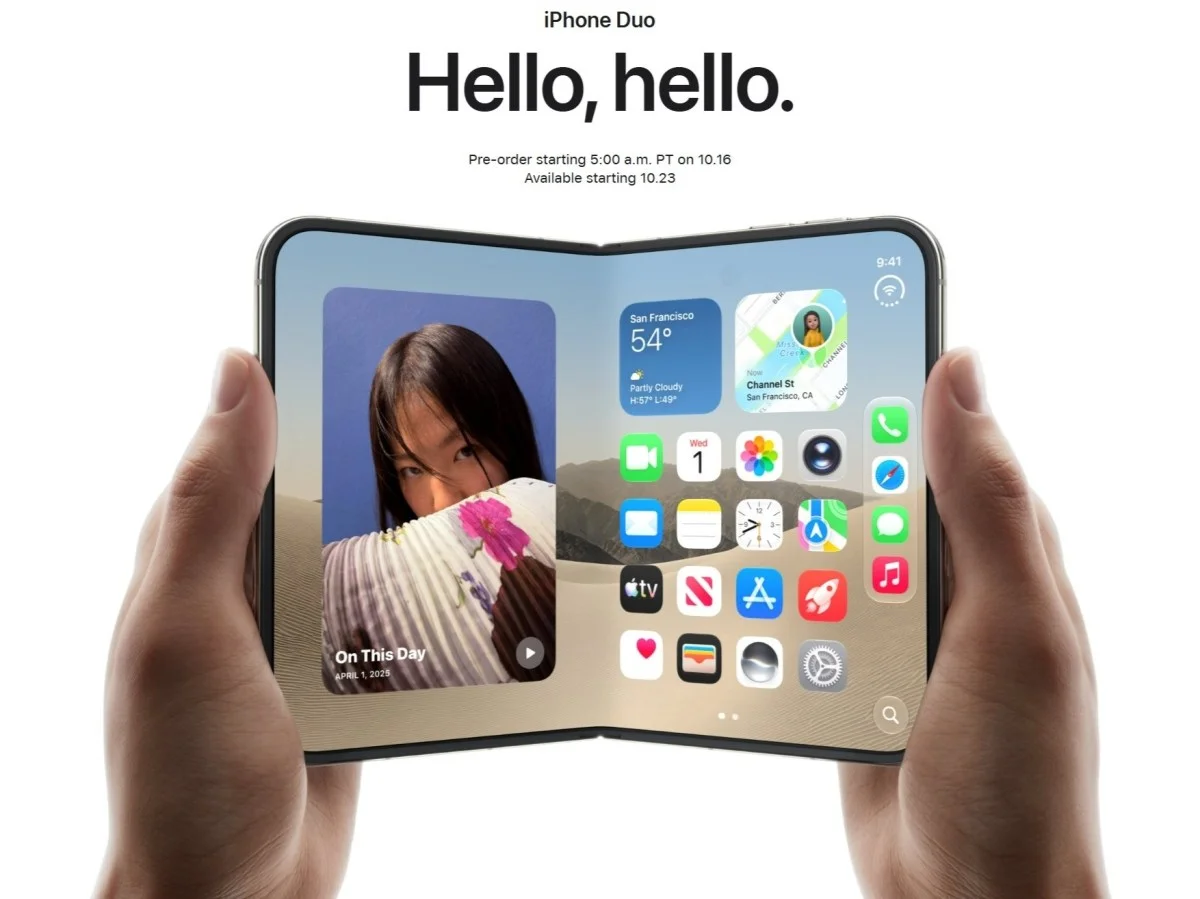
Apple’s Get Ready feature lets you configure your iPhone Duo, pick a color, choose storage, and arrange trade-in details before checkout opens. According to Apple’s newsroom, customers who saved their choices to the shopping bag before 9 p.m. PT on October 15 could check out with a single click once pre-orders went live.
If you missed that deadline, you can still use Get Ready now. The Apple Store app and website let you pre-save shipping, color, storage, and trade-in info. That saves you from fumbling through forms while stock disappears.
Step 2: Decide on Storage and Color
The iPhone Duo comes in two colors: star white and night sky. Storage tiers are 256GB ($1,999), 512GB ($2,199), 1TB ($2,599), and 2TB ($3,199). The 256GB model is the volume seller, so it will likely sell out first. If you shoot a lot of video or plan to use the Duo as a tablet replacement, 512GB is the safer pick.
Step 3: Check Trade-In and Carrier Deals
Apple Trade In gives you an instant credit between $175 and $885 when you trade in an eligible iPhone 13 or newer. That credit lowers your monthly payments through Apple Upgrade, Apple Card Monthly Installments, or a carrier deal.
Carrier offers are aggressive. Verizon bundles the device with an unlimited plan for $72 per month. AT&T offers up to $1,200 off with a trade-in and a new plan. T-Mobile offers up to $1,000 off with a trade-in and a new plan. Read the fine print on all of them, because the maximum discount usually requires a premium unlimited plan.
Step 4: Consider Apple Upgrade Leasing
Apple Upgrade, provided by Klarna, offers 12- and 24-month lease options. A 24-month lease for the iPhone Duo starts at $57.99 per month, excluding taxes and trade-in credit. At the end of the term, you can upgrade to the latest model, buy the device outright, or return it and exit the program. This is the cheapest monthly entry point if you do not want to pay full price upfront.
Step 5: Order Fast and Refresh the Store
Apple is bringing the Apple Store back online in waves. If you do not see the iPhone Duo pre-order option immediately, refresh both the website and the app. MacRumors notes that customers who used Get Ready should be able to check out with a couple of taps. 9to5Mac confirms that the first orders arrive October 23.
If you are stuck in a queue, try switching between the website and the app. Apple’s global content delivery system spins up in data centers at different times, so some buyers see the store before others.
What You Get for the Money
The iPhone Duo has a 5.4-inch outer display that unfolds into a 7.6-inch inner display. It runs on the A20 Pro chip and has a dual-camera system with a 48MP Main and 48MP Ultra Wide. There is a Center Stage front camera and a FaceTime camera under the inner display. It is IP68 water and dust resistant, and at 5.2mm unfolded, it is Apple’s thinnest iPhone ever.
The hinge has more than 100 components and supports multiple angles. The frame is aluminum and titanium with ceramic fiber antenna inserts. It uses Touch ID instead of Face ID, and there is no telephoto lens. iOS 27 adds Split View multitasking, StandBy mode on either display, and Siri AI with onscreen awareness.
Should You Buy AppleCare+
Yes, and this is not optional for most people. Some iPhone Duo repair fees reach $1,499 without a protection plan. AppleCare+ covers drops, spills, and in some regions theft and loss. AppleCare One Individual extends coverage to two more devices at the same monthly price. In the US, AppleCare One Family covers every eligible Apple product in your Family Sharing group.
What to Do If It Sells Out
Rumors suggest iPhone Duo supplies are limited due to production issues. If launch-day delivery slips, you have options. Check carrier inventory, which sometimes moves slower than Apple’s own store. You can also visit an Apple Store in person. Apple retail stores will customize the boot-up of your device with your name, so it says “Hello, Mark” when it turns on. That perk is US only, Duo only, and works in English and Spanish.
If you order online and delivery dates stretch into November, keep your order. Apple often improves shipping estimates as production catches up. Canceling and reordering usually puts you further back in line.
One More Thing to Check
New and qualified returning subscribers who buy an iPhone Duo can get three months of Apple One for free. That bundles Apple TV, Apple Music, up to 2TB of iCloud+ storage, and more. It is a small perk, but it adds up if you were already paying for those services separately.
The iPhone Duo pre-order is live now. The 256GB model at $1,999 is the one most people will want, and it is also the one most likely to disappear first. If you have been waiting for Apple’s first foldable, this is the moment to act. Set a reminder, open the Apple Store app, and finish your iPhone Duo pre-order before the delivery window slides.
Frequently Asked Questions (iPhone Duo pre-order)
When does the iPhone Duo go on sale?
Pre-orders are live now. Shipments and sales begin October 23 in over 70 countries, with 28 more countries starting October 30.
How much does the iPhone Duo cost?
The iPhone Duo starts at $1,999 for 256GB. Storage tiers go up to 2TB at $3,199. Carrier deals can bring the monthly price down to $55 per month with trade-in.
Does the iPhone Duo have Face ID?
No. The iPhone Duo uses Touch ID instead of Face ID, and it has a two-lens camera system without a telephoto lens.
Related Articles
- Ukrainian drones hit Russian data centers: Yandex outages
- Kojima on Joker 2: Why the Divisive Flop Will Age Well
- GBU-43/B MOAB: Why This 21,600-lb Bomb Won’t Crack Iran
- Tems: Writing Music Helps Me Heal, Release Pain
- Big Walk Dev Explains Lack of Xbox: A Masterstroke or Missed Opportunity?
FIRST TIME REACTIONS:
Be the first to leave us a comment – iPhone Duo Pre-Order: 5 Steps to Secure Yours, down the comment section.
JOIN US ON OUR SOCIAL MEDIA:
-

 Startups1 month ago
What a Successful Dangote Refinery IPO Really Says
-
Savings & Investing1 week ago
Hidden Medicare Fees Draining Your Retirement Savings
-
Health and Fitness3 weeks ago
Curly Hair Hydration: 5 Proven Steps That Actually Work
-
Tech & Gadgets4 weeks ago
Apple Watch and AirPods Fall Deals: Save $120 Today
-
University Admissions1 month ago
UNILAG 2026/2027 Admission: Direct Entry & Post-UTME Guide
-
Football1 month ago
South Carolina vs Alabama: Tide Roll to 35-10 Halftime Lead
-
Football1 month ago
Mexico vs Colombia 2026: Márquez Debut Ends in Defeat
-
World News1 month ago
Carney Calls U.S. Tariffs a Miscalculation as Canada Retaliates